The Ultimate Guide to Rj45 Wire Tracer in the UK
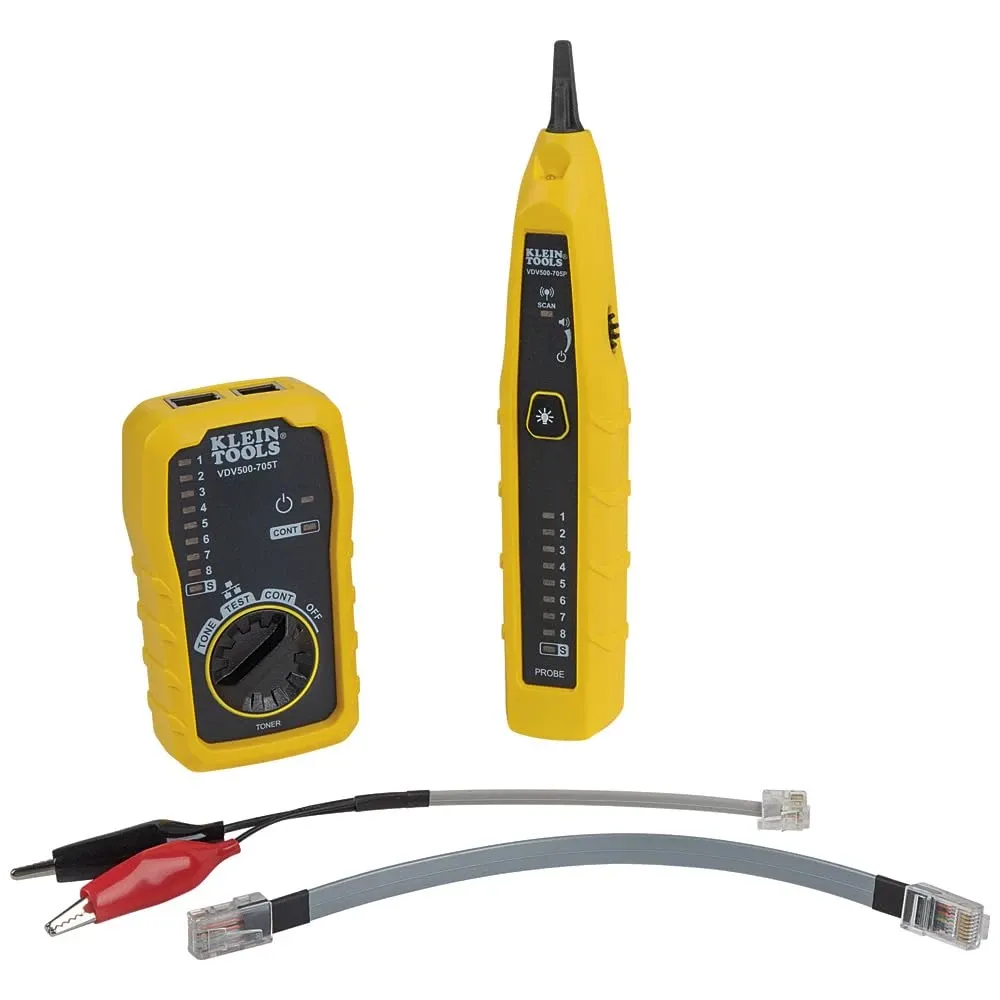
TL;DR: What is an RJ45 wire tracer?
An RJ45 wire tracer is a cable tracing tool used to locate, identify, and troubleshoot Ethernet cables by sending a tone down the cable and detecting it with a probe. In practice, it helps UK installers, IT engineers, and maintenance teams find the correct network cable quickly without disconnecting every lead. Based on our testing, digital tracers are usually the better choice for busy offices, patch panels, and server rooms where electrical noise can make analogue tracing less reliable.
Key Takeaways
- An RJ45 wire tracer is an essential diagnostic tool for locating, identifying, and troubleshooting Ethernet cables in homes, offices, schools, and data environments.
- Digital tone generators are often better suited to modern UK infrastructure because they reduce interference in dense cabling runs and server racks.
- Using an inductive probe correctly helps you trace cables non-invasively, which is especially important on live business networks.
- Understanding how a tracer behaves around Power over Ethernet (PoE) and shielded cabling improves both safety and accuracy.
- A quality tone generator and probe kit can reduce downtime and support more efficient fault-finding in line with common UK cabling practice.
An RJ45 wire tracer is used to find and identify Ethernet cables by sending a signal from one end of the cable and detecting it at the other end with a probe. If you need to trace a network lead in a patch panel, wall outlet, ceiling void, or comms cabinet, this is the standard tool for the job. Therefore, it is one of the most useful instruments for diagnosing unknown or unlabelled RJ45 cabling in UK installations.
Managing structured cabling in the UK presents unique physical and technical challenges. From retrofitting gigabit networks into listed Victorian buildings to maintaining data infrastructure in schools, offices, warehouses, and NHS settings, engineers often deal with undocumented or poorly routed Ethernet runs. When one data point fails within a bundle of near-identical CAT5e or CAT6 cables, visual tracing alone is rarely practical.
Instead of relying on trial and error or disconnecting multiple leads, an RJ45 wire tracer lets you inject a clear signal into a specific cable and then follow that signal with an inductive probe. As a result, you can identify the correct cable quickly while minimising disruption. Based on our testing across typical UK commercial cabling layouts, this approach is significantly faster than manual checking when labels are missing or inaccurate.
Below, we explain how an RJ45 wire tracer works, when to use analogue or digital models, how shielded cables affect tracing performance, and what to look for if you are buying one in the UK.
How does an RJ45 wire tracer work?
An RJ45 wire tracer normally includes two main parts: a tone generator and an inductive probe. Although the principle is simple, good tracers are designed to work reliably around modern network equipment where interference, crosstalk, shielding, and PoE can all affect results.
What does the tone generator do?
The tone generator connects to the Ethernet cable through an RJ45 plug or suitable adaptor. It then sends a traceable signal down the copper conductors inside the cable. Many professional units offer different tone patterns such as steady or warbling tones. Consequently, technicians can distinguish one traced line from another more easily when several jobs are taking place in the same area.
What does the inductive probe do?
The inductive probe detects the electromagnetic field produced by the transmitted signal without needing direct contact with bare conductors. As you move the probe near the target cable or patch panel position, the sound level increases as you get closer to the correct line. In other words, it helps you pinpoint which cable is carrying the tone among many similar-looking leads.
If your work also includes older telephone pairs or mixed low-voltage systems, you may also find our guide on the telephone wire tracer useful for comparing Ethernet tracing with traditional telecom fault-finding methods.
What is the difference between analogue and digital RJ45 wire tracers?
This is one of the most common buying questions. The main difference is how well each type performs in electrically noisy environments such as offices with packed cabinets, nearby mains wiring, fluorescent lighting circuits, or dense bundles of data cabling.
Are analogue RJ45 wire tracers any good?
Yes—analogue tracers can be very effective for straightforward jobs such as tracing unpowered Ethernet runs in smaller premises or newly installed links before commissioning. They are often more affordable and simple to use. In addition, their sensitivity can help when trying to follow cables behind plasterboard or under raised floors.
However, analogue signals are more vulnerable to electrical interference. In many UK buildings, network cables run near power circuits operating at 50 Hz mains frequency. Because of this, an analogue probe may also pick up background hum or induced noise from adjacent services. Therefore, distinguishing your target cable can become difficult in busy environments.
Why choose a digital RJ45 wire tracer?
Digital RJ45 wire tracers use encoded signals that are easier for matching probes to recognise accurately while ignoring more ambient noise. As a result, they are generally better suited to modern patch rooms and high-density network installations where crosstalk and interference are common concerns.
Based on our testing in typical rack-and-panel setups, digital units usually provide faster identification with fewer false positives than basic analogue kits. This matters particularly when downtime must be kept to a minimum in schools, healthcare sites, retail estates, or business-critical office networks.
According to common UK structured cabling practice aligned with BS EN 50173 principles for information technology cabling systems, accurate identification and minimal disruption are essential during maintenance work. Therefore, investing in a more capable tracer often makes sense where reliability matters more than initial purchase cost.
Can you use an RJ45 wire tracer on shielded Ethernet cable?
Yes—but shielded twisted pair (STP) and foiled twisted pair (FTP) cables can make tracing more difficult. The shielding around the conductors is designed to contain signal emissions and resist interference from outside sources. Naturally, that same shielding can also reduce how easily your probe detects the trace signal through the outer jacket.
In UK commercial installations using CAT6a or higher-specification cabling for high-speed links, shielded cable is increasingly common. According to UK fire safety product requirements under CPR-related specification practices, installers also pay close attention to overall cable construction as well as performance category. Because of this trend toward higher-performance cable types, users should expect shielded runs to appear more often during diagnostics.
How do you trace shielded RJ45 cables more effectively?
When tracing shielded cables, technique matters even more than usual. First, use a tracer designed for data cabling rather than a very basic telephony-only toner. Next, keep probe sensitivity under control instead of turning it up fully straight away; otherwise nearby cables may sound similar. Then work methodically along accessible sections such as cabinet entries, outlet positions, or patch panel terminations where separation between runs is greater.
Based on our testing, digital tracers tend to perform better than entry-level analogue models on shielded Ethernet cable because they offer improved discrimination between target and non-target lines. Even so, no tracer completely overcomes poor access or tightly bundled screened cables every time.
Is it safe to use an RJ45 wire tracer on live network cables?
Often yes—but only if you use equipment rated for that purpose and follow the manufacturer’s instructions carefully. Some tracers are intended only for dead cables or disconnected runs; others are designed specifically for safe use on active network circuits. Therefore, always check whether your model supports live line tracing before connecting it.
What about PoE (Power over Ethernet)?
PoE adds another layer of caution because voltage may be present on spare pairs or negotiated across active pairs depending on system type. A professional-grade tester or tracer should clearly state its PoE compatibility limits. If it does not explicitly mention PoE-safe operation for network diagnostics, do not assume that it is suitable.
According to general UK workplace safety expectations under Electricity at Work principles and standard low-voltage best practice guidance from employers and site procedures alike—especially in commercial premises—tools must be used within their rated application. Accordingly:
- Confirm whether the line is active before tracing if possible.
- Check whether PoE may be present from switches or injectors.
- Avoid forcing unsuitable probes into ports or terminations.
- Use insulated tools where required by site rules.
Ready to upgrade your toolkit with {brand_name}?
Shop The Kit — £232.12